Same window, from the terminal
A Textual-based companion to the Dashboard. Same read-only posture, same walk-away promise, rendered in a single pane of glass that fits over SSH.
The TUI is a live monitor over the same session state the Dashboard renders. It does not let you assign work, retry a play, or steer an agent. The footer keys are navigation, inspection, and alarm-time escape hatches, not steering. The policy still picks every play.
Swink AgentShore™ ships two UIs: the Dashboard (the desktop GUI, with the pixel-art floorplan) and the TUI (this page). Both subscribe to the same audit log. Pick whichever fits where you're sitting: on the laptop after dinner, or over SSH from a hotel.
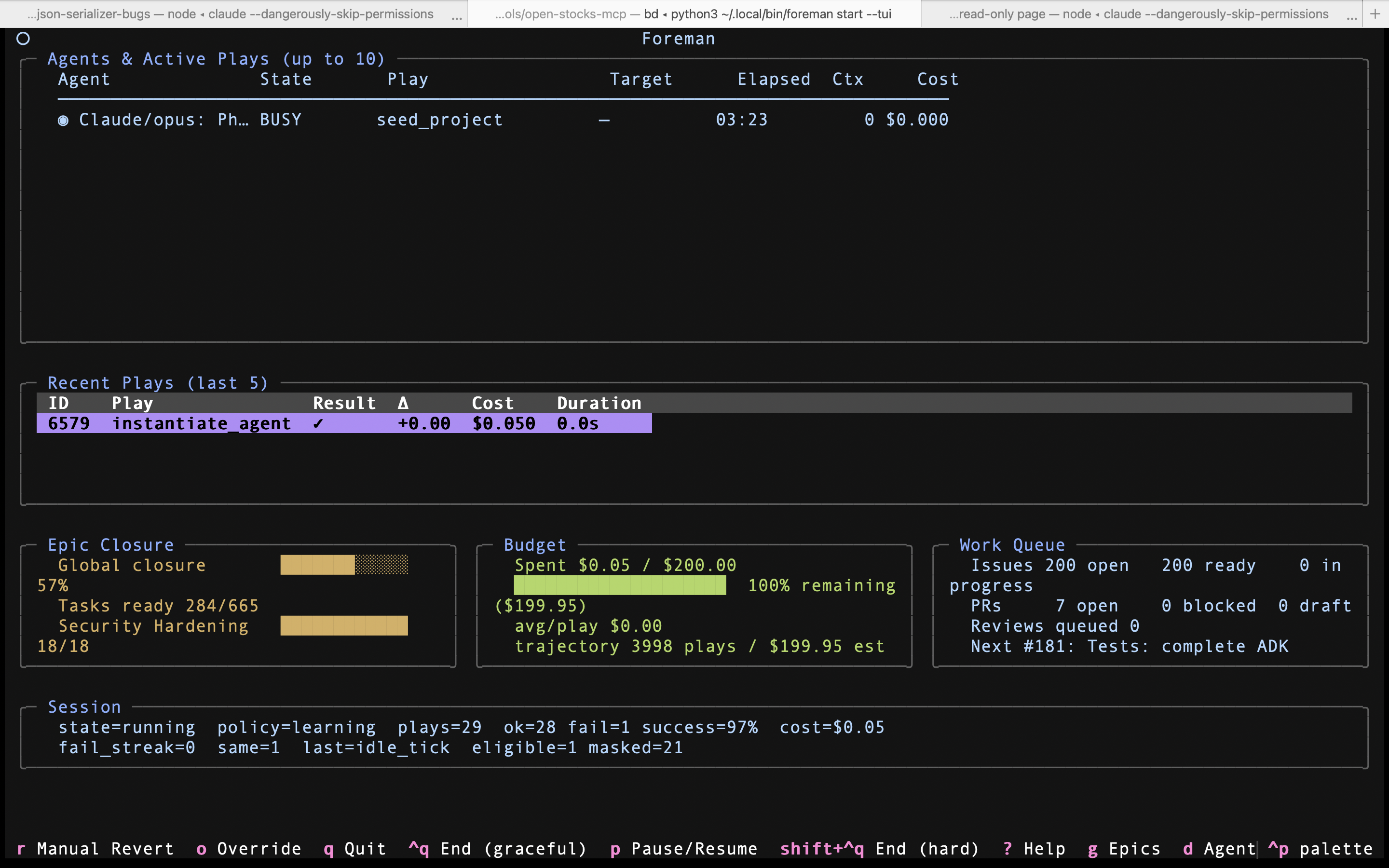
seed_project. Bottom row: Epic Closure with the global bar tracking against 665 tasks, Budget at $0.05 / $200, Work Queue showing 200 issues / 7 PRs / next up #181. The footer lists every binding the TUI exposes, the actual control surface.The TUI came first; the Dashboard came when a glance needed more
The TUI was the original interface. It ran the whole loop fine, right up until watching a long session meant wanting to see more activity at a glance. That is what the Dashboard is for: the pixel-art office floorplan, the agent roster, the full theme system. The TUI didn't get retired. It's the same backend behind a simpler, less rich surface.
So you choose how much UI a run gets. Fully headless for CI and scripting, with everything still written to the audit log. The TUI when you like a terminal, or you're on SSH, a thin client, or a machine where you don't want a Tauri window resident in memory. The Dashboard when you want the richest view of what's happening.
Every surface reads the same audit log, and nothing about watching changes the run. Closing one doesn't affect it. Opening another doesn't either. The UIs are observers, not the orchestrator.
Eight regions, one screen
Each region renders a slice of the latest session snapshot. None of them are interactive in the steering sense. The footer keys let you navigate, inspect, pause, and end the session, but never assign a play or override the policy mid-tick.
1. The alert bar
Hidden by default. Only visible when something needs attention: a loop-detection escalation, a feedback-needed prompt, or a session-paused notice. The TUI surfaces the alarm; it does not auto-resolve it.
2. Agents & Active Plays
Up to ten agents in a dense table: live status glyph, name, state, current play, target (issue or PR), elapsed time, context window in use, and dollar cost. The roster the Dashboard renders as sprites, in one screen of text.
3. Recent Plays (last 5)
A scrollable DataTable of the most recent completed plays, newest first. Each row: play ID, play name, result, the reward delta (Δ) the policy received, cost, and duration. This is the trajectory the policy is learning from, surfaced read-only.
4. Epic Closure
Global closure ratio at the top, then per-epic bars showing closed / total tasks. The background tint shifts low / medium / high as the average alignment crosses thresholds. The same beads-graph signal that drives the policy's alignment reward.
5. Budget
Spent and remaining against the cap. A 20-cell █░ bar with a percentage. The border tints green / amber / red as you cross 50% / 20% remaining. When a wall-clock cap is set, the panel also shows time remaining beside the dollar figure. The headline numbers the Human Engineer set before walking away.
6. Work Queue
Open issues, how many are ready, how many in progress. Open PRs, blocked, drafts. Reviews queued. The next-up issue title. This is the policy's working set rendered as numbers, not the policy's choice.
7. Session line
One row of RL telemetry: session state, policy mode, total plays, success counts, total cost, failure streak, last play, and how many of the 22 actions are eligible right now vs masked. The compact view of what the policy is doing.
8. Key bindings
A single row of single-character bindings. Three end the session in different ways, two are escape hatches when the policy is stuck, the rest navigate to subscreens (epics, agent detail, help, palette). Every binding is enumerated below.
Navigation, inspection, and the way out
Every binding the main TUI exposes is in the footer. Group them three ways: ending the session (graceful or hard), the single pause lever, and navigation into subscreens and inspection views. None of them assign a play, override a decision, or steer an agent.
End the session
- ^q End (graceful)
- Tell the orchestrator to drain at the next safe boundary. In-flight plays finish, no new plays dispatch, then the session winds down cleanly.
- shift + ^q End (hard)
- Cut the session now. In-flight plays are aborted. Reserved for the cases where graceful drain isn't fast enough.
Once a drain starts, the shutdown screen adds q Quit and r Report, the only place those two keys are live.
Pause
- p Pause / Resume
- Holds the dispatcher. In-flight plays finish, no new plays start, the session sits idle until you resume. The one in-session lever, useful when the alarm is "let me look at this before another play fires."
Navigation & inspection
- g Epics
- Jump to the epics screen: the full per-epic closure breakdown the dashboard summarizes in three bars.
- d Agent
- Open the selected agent's detail screen. Trajectory, recent plays, context, spend. Read-only, like the rest.
- i Issues
- The issue backlog as Swink AgentShore™ sees it: the open work the policy is sequencing through GitHub.
- l Learnings
- Session learnings and agent handoffs: the notes carried forward into later plays' context.
- ? Help
- The full keymap and screen index, so the footer doesn't have to.
Two exits, one pause, five inspection views. Nothing in the set lets you reassign a play, override a single decision, or steer an agent's prompt. If the binding you need isn't there, the answer is upstream: tighter spec, adjusted budget, a hard gate the catalog should have. Not a richer TUI.
The same screen at 100, 60, and 40 columns
The TUI snaps between three layouts based on terminal width. At ≥100 columns you get the full mock above. At 60-99 the play history trims visible rows and the three-up bottom row stacks. At 40-59 only the essentials render. Below 40 the screen replaces itself with an alert telling you to resize. The contract is that the read-only window keeps working no matter where you're SSH'd in from.
Things the TUI intentionally doesn't do
Same negative space as the Dashboard. Different rendering, same posture.
- No "assign this play" prompt. You can't
:playa command. The policy picks. - No agent prompt box. Selecting an agent shows its trajectory line. There's no text input to direct it.
- No interactive PR review. Review lives in GitHub. The TUI reports the audit.
- No spec editor. The spec is upstream. Edit it in the repo, start a new session.
- No mouse-driven menus. One row of single-key bindings, no chrome. The terminal is a window, not a controls panel.
The shared rule
The Dashboard and the TUI render the same audit. They make the same promise: the run keeps going whether you're watching or not. The whole point of AgentShoring is the walk. The TUI is just the version of the window that fits over SSH.